Daily planning for freelancers
Several clients. One realistic day.
Bring client work, meetings, and life admin into one daily plan. See what fits before saying yes to more.
7 days free. No card required.
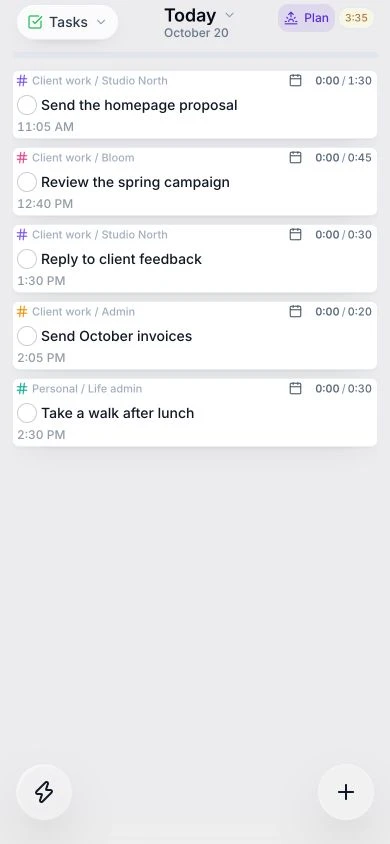
One view of your work
Keep client tasks and personal commitments in the same plan.
Know what fits today
Make room for focused work around calls, admin, and breaks.
Take your plan with you
Review and edit tasks on web, iOS, and Android, even offline.
Your clients keep their tools
Bring the work together. Keep the big picture.
Choose tasks from supported tools such as Asana, Todoist, and Gmail. Use tags to group client work and decide what deserves time today.
See how to organize work across apps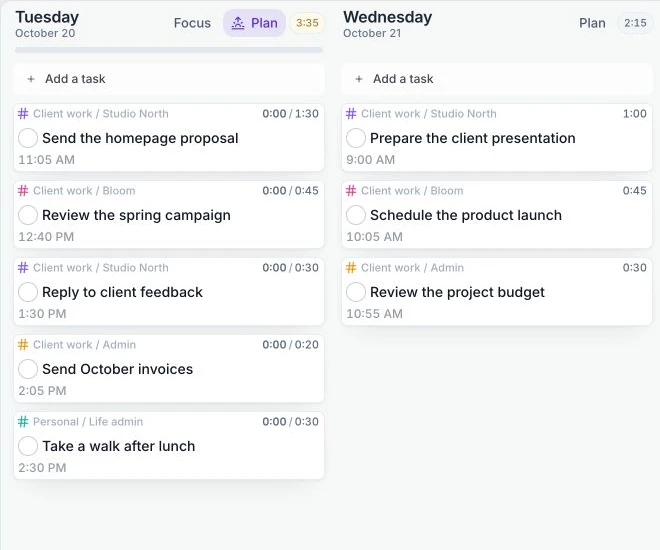
An example freelance day
Make the plan fit the hours.
Seven working hours. Calls, admin, and a little breathing room. Three clear outcomes for the time that is left.
Learn to build a realistic day →Illustrative plan · adapt it to your day
- Working day
- 7 hours
- Client calls
- 1.5 hours
- Admin
- 1 hour
- Breaks and buffer
- 1 hour
Time for your priorities
3.5 hours- Send the homepage proposal90 min
- Finish the client campaign75 min
- Reply to client feedback45 min
A little more detail
Explore the way you want to work.
A few things you might be wondering.
Do my clients need to use Juno?
No. Juno is your personal daily planner. Keep working with clients in their existing tools and bring selected tasks from supported integrations into your own plan.
What happens when an urgent request arrives?
Estimate the new work and check the time left. Use your buffer or move a flexible task to another day, so the trade-off stays clear.
Can I plan away from my desk?
Juno is available on web, iOS, and Android. You can read and edit tasks offline; changes sync when you reconnect. First sign-in and live integrations need a connection.
Your next workday, with a little more clarity.
Start with one client, one important outcome, and the time you actually have.
Start free trial7 days free. No card required.
Running a small business? Explore planning for business owners →