How to Plan a Realistic Workday When You Work for Yourself
A practical daily planning method for freelancers and small business owners: choose clear outcomes, estimate the work, and make room for interruptions.
A useful daily plan answers two questions: what will you finish today, and when can that work happen? When you work for yourself, client requests, business admin, appointments, and personal responsibilities all compete for the same hours.
This workflow gives each commitment a place without making every task a commitment for today. You can use it with a notebook and calendar, or follow it in Juno for freelancers and small business owners.
Start with the time that is already spoken for
Check appointments, travel, preparation, breaks, and any fixed personal commitments. Count working time separately from lunch. A seven-hour workday with 90 minutes of appointments does not leave seven hours for tasks.
Then account for routine work and uncertainty. In this illustrative day:
- Working time, excluding lunch: 7 hours.
- Appointments: 90 minutes.
- Email and routine admin: 60 minutes.
- Breaks and unexpected requests: 60 minutes.
- Time left for chosen deliverables: 3 hours 30 minutes.
Those allocations are a starting point, not a universal formula. A day spent serving customers may need a much larger allowance for interruptions. Look at your own recent days before choosing the buffer.
Choose outcomes you can actually finish
Write tasks in a way that makes completion observable. “Marketing” is an area of responsibility; “send the revised campaign copy for approval” is an outcome. “Suppliers” becomes “confirm the order quantities with the supplier.”
Choose the outcomes that matter today because of a real deadline, a promise, or progress you have deliberately decided to protect. Keep other work in a backlog you review. Being visible in your system does not have to mean being scheduled for today.
If an outcome is too large, choose the next finishable step. Drafting the proposal and sending the final proposal may belong on different days.
Estimate before filling the calendar
Give each chosen task a duration that includes preparation and review. Use previous work as your reference where possible. When you do not know how long something will take, make the uncertainty visible and leave space to learn.
For the three and a half hours available above, one possible plan is:
- Revise and send a client deliverable: 90 minutes.
- Draft the next proposal: 75 minutes.
- Prepare tomorrow’s customer appointment: 45 minutes.
Put those tasks into available calendar space, accounting for which work needs an uninterrupted block. Three separate half-hour gaps are not always a usable 90-minute writing session.
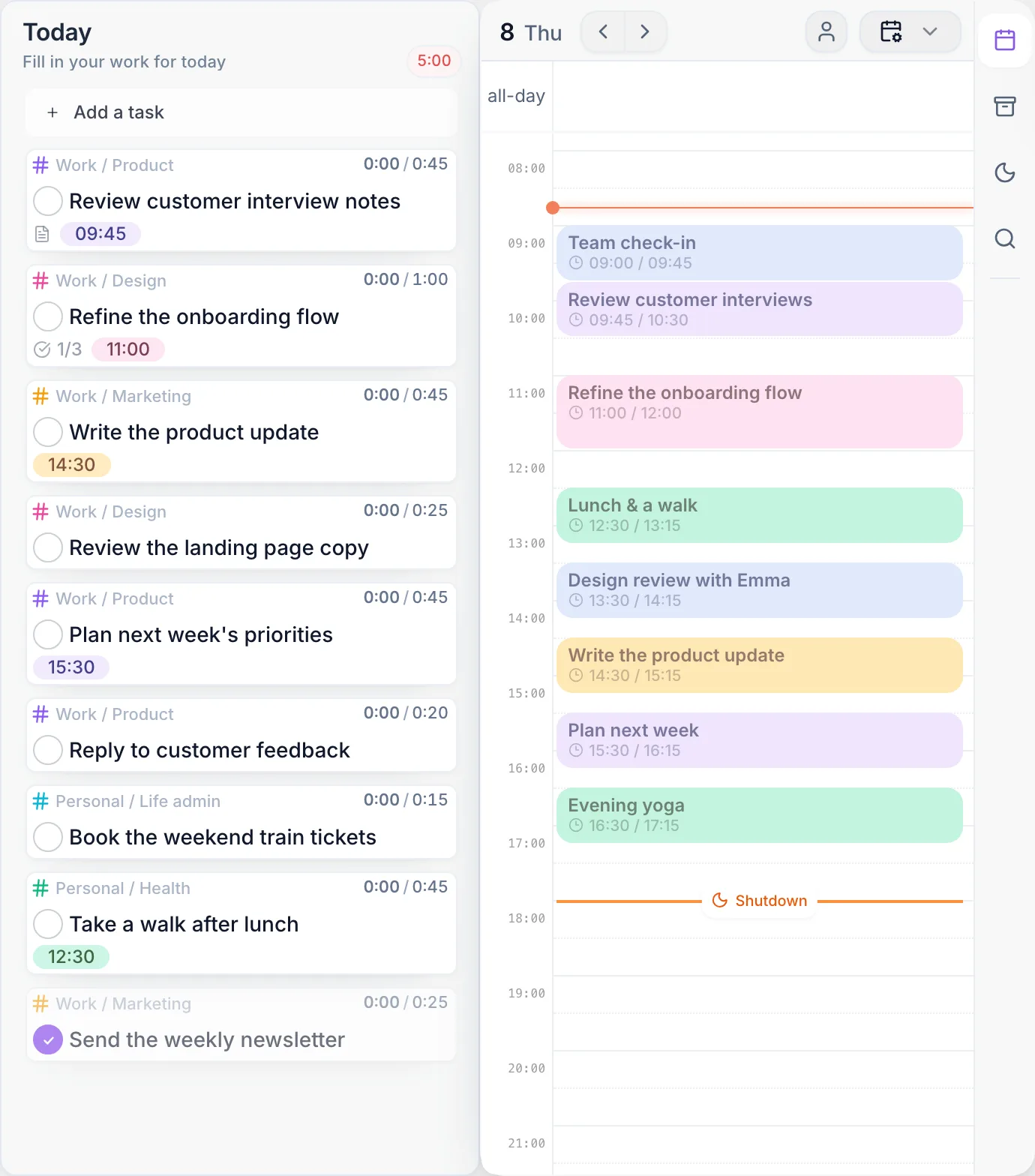
In Juno, use time estimates and calendar planning to compare tasks with the time available. The morning ritual guides the review and selection of work for the day.
Make new requests a decision
An urgent request arrives and needs 45 minutes. Check what must happen today and what can wait. If the work is necessary, use available buffer time or move another task. If neither is possible, renegotiate the commitment.
Adding the request without changing anything else hides the trade-off. Replanning makes it explicit. When a task takes longer than estimated, use the same process rather than letting the entire schedule silently drift.
For work spread across clients, use the multiple-client planning workflow. For requests scattered between tools, follow the connected-work guide.
Copy this daily planning template
Working hours today:
Fixed appointments, preparation, and travel:
Routine admin and communications:
Breaks and interruption buffer:
Time left for deliverables:

Outcome 1 / definition of done / estimate / time block:
Outcome 2 / definition of done / estimate / time block:
Outcome 3, if it fits / definition of done / estimate / time block:

What can wait:
If something urgent arrives, what can move:
End-of-day review time:
Use fewer outcomes when the day requires it. The template is a way to make decisions, not a target to fill every line.
Close the day and improve the next estimate
Review completed work, record the next step for unfinished tasks, and decide when to revisit them. Compare estimates with the work you actually did. Repeated overruns may mean the task needs a smaller scope or that routine admin needs more space.
Juno’s shutdown ritual supports that review. You can keep working with tasks offline; live integrations and calendar refresh need a connection. See mobile and offline behavior.
Should I plan every minute?
Reserve time for commitments and meaningful work, but leave room for how your day behaves. A tightly packed schedule is especially fragile when customers or clients can interrupt it.
What if I finish less than I planned?
Review the cause: an estimate, an interruption, a dependency, or too much work selected. Change tomorrow’s assumptions instead of automatically carrying the entire list forward.