Juno vs Ellie
Choose Juno when your work lives across tools.
Plan from the emails, issues, and tasks you already have. Review them in Juno, choose what deserves today, and check what fits around your meetings.
7 days free. No card required.
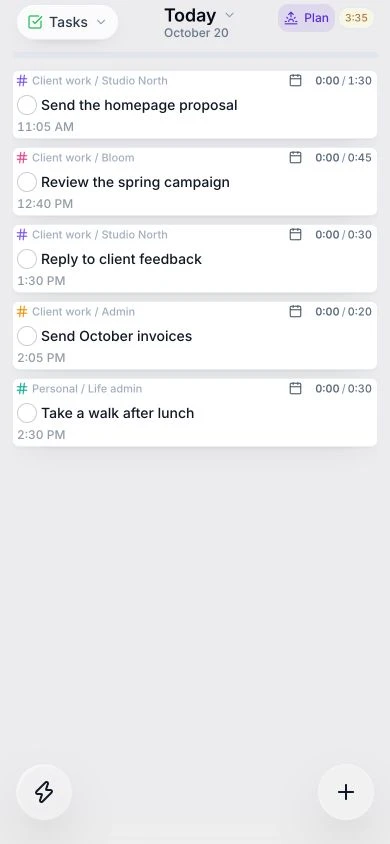
Work from your real inbox
Read and act on Gmail or Outlook messages beside your planner, then turn the work you choose into tasks.
Check capacity before committing
Preview estimated tasks around meetings and working hours. See overflow before reserving calendar time.
Give each responsibility its place
Use contexts, tags, and custom schedules to organize client work, personal tasks, and the hours available for each.
Both cover the daily-planning essentials.
Task capture, estimates, time blocking, focus, and daily review are available in both. The practical question is how your work gets into that routine.
A client request in Gmail. A delivery in Linear.
In Juno, review both beside your calendar, turn the work you choose into tasks, and check estimates against meetings and working hours. If the day is full, move work before committing to it.
See the connected-work workflowThe essentials, side by side
How they compare
| Feature | Juno | Ellie |
|---|---|---|
| Email into your daily plan | Browse Gmail and Outlook inboxes, reply or archive, and drag selected messages into your plan. | Forward emails to create tasks with the original email attached. |
| Work from team tools | Browse Linear, GitHub, Jira, Asana, and Todoist inside Juno. Review source items and drag selected work into your day. | Sync Notion and Todoist, capture Slack messages, and bring tasks in through Zapier. |
| Organizing different responsibilities | Contexts and tags, with custom working hours for different clients or types of work. | Lists, labels, and filters to organize tasks and view related work. |
| Mobile apps | iPhone, iPad, and Android apps | iPhone and iPad apps |
| Capture work for later | Backlog and daily lists | Brain Dump and daily lists |
| Estimates and time blocking | Estimate tasks and drag them into calendar time blocks. | Estimate tasks and drag them into calendar time blocks. |
| Focus and daily review | Focus tools, daily planning, and shutdown. | Focus tools, daily planning, and shutdown. |
| Start without an external calendar | Plan tasks and time blocks without connecting an external calendar. | Plan tasks and time blocks without connecting an external calendar. |
Which fits your day?
Juno
Choose Juno if your day spans email, team tools, and different clients. Review source work inside the planner, set working hours by context or tag, and preview whether your estimated tasks fit around meetings before committing.
Ellie
Ellie is a fit if you prefer its Brain Dump and Timebox workflow and its Notion, Todoist, Slack, or Zapier connections cover the work you need to bring in.
From a list to a day
Make room for the work you choose.
Keep later tasks in your backlog. Give today's priorities an estimate, check your meetings, and build a plan you can follow.
See time blocking in practice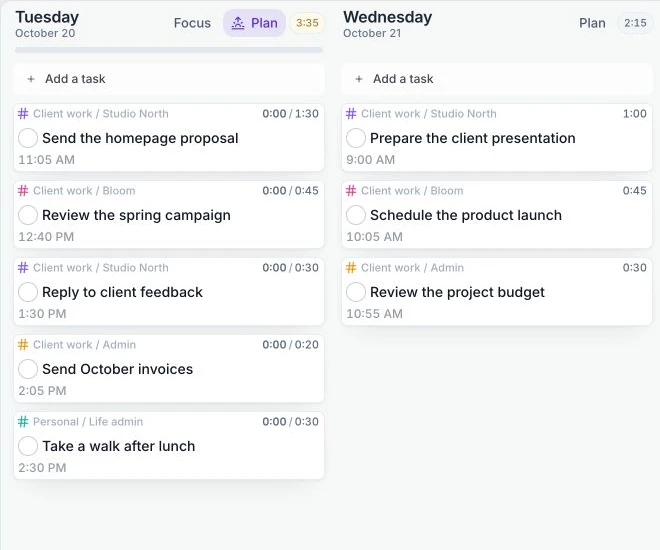
A little more detail
Explore the way you want to work.
A few things you might be wondering.
When does Juno make more sense than Ellie?
When planning starts with work scattered across email and team tools. Juno lets you review those sources beside your planner, choose the work that needs your time, and use estimates, working hours, and calendar projections to shape a realistic day.
Can I use Juno offline?
You can read, create, edit, and complete tasks offline. Changes sync when you reconnect. First sign-in and live calendar and integration refresh need a connection.
Can I try Juno before subscribing?
Juno has a 7-day free trial with no card required, followed by a paid subscription. There is no permanent free plan.
Try a clearer plan for tomorrow.
Start with your own tasks and meetings. See how Juno fits your day.
Start free trial7 days free. No card required.
Sources & notes
Comparison reviewed on . Features and plan limits can change. Consult the official product guides linked below.
- Juno: iPhone and iPad app
- Ellie: features and platforms
- Ellie: email to task
- Ellie: time blocking without an external calendar
- Juno: inbox and integration workflows
- Juno: calendar planning
- Juno: contexts and custom schedules
Juno: calendar planning, integrations, daily rituals, and mobile and offline. Task editing works offline; sign-in and live integration refresh need a connection.